[실습]쿠버네티스 설치 및 리소스 배포
Table of contents
실습 1. 명령형 파드 배포
본 실습에서는 kubectl run 명령을 통해 nginx 파드를 배포합니다. Pod 배포 명령명령은 다음과 같습니다. kubectl run <NAME> --image <IMAGE>
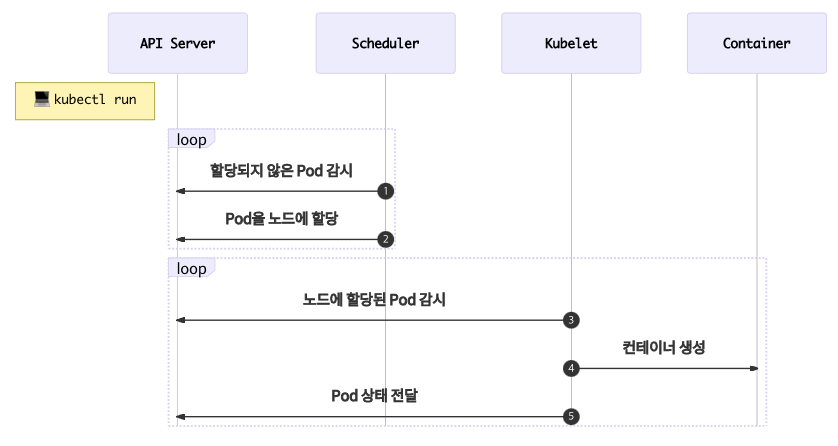
💡 참고 : 다른 터미널에서 watch -d ‘kubectl get pod’ 명령을 통해 파드 정보를 확인해보자(선택)
- Pod 배포
# kubectl run <NAME> --image <IMAGE>
kubectl run myweb1 --image nginx
kubectl run myweb2 --image nginx && kubectl get pod -w
- Pod 정보 확인
kubectl get pod
- Pod 배치 노드, Pod 의 IP 정보를 확인
kubectl get pod -o wide
- Pod 상세 정보 확인
kubectl describe pod myweb1
kubectl describe pod myweb2
- Pod IP 를 변수에 지정
WEB1IP=$(kubectl get pod myweb1 -o jsonpath='{.status.podIP}')
WEB2IP=$(kubectl get pod myweb2 -o jsonpath='{.status.podIP}')
- Pod(Nginx) 에 curl 접속 및 Pod 로그 확인
ping -c 1 $WEB1IP
ping -c 1 $WEB2IP
curl $WEB1IP
curl $WEB2IP

kubectl logs myweb1
kubectl logs -f myweb1
- 컨테이너 명령 전달
kubectl exec myweb1 -- ls /usr/share/nginx/html/
kubectl exec myweb1 -- cat /usr/share/nginx/html/index.html
kubectl exec myweb1 -- hostname
- Pod 이름만 출력
kubectl get pod -o jsonpath='{.items[*].metadata.name}'
kubectl get pod|awk 'NR>1 {print $1}'
kubectl get pod|awk 'NR>1 {print $1}'|grep myweb
- Pod IP만 출력
kubectl get pod -o wide|awk 'NR>1 {print $6}'
- nginx Pod 의 index.html 에 각 컨테이너 호스트이름을 기록
for pod in $(kubectl get pod|awk 'NR>1 {print $1}'); do kubectl exec $pod -- /bin/sh -c "hostname > /usr/share/nginx/html/index.html"; done
- Pod IP로 curl 접속 시도
for podIP in $(kubectl get pod -o wide|awk 'NR>1 {print $6}'); do curl -s $podIP; done
- Pod 삭제
# kubectl delete pod <NAME>
kubectl delete pod $(kubectl get pod|awk 'NR>1 {print $1}')

# 혹은 kubectl delete pod --all
kubectl get pod
실습 2. 명령형 디플로이먼트 배포
본 실습에서는 kubectl create 명령을 통해 파드를 관리하는 상위 객체(컨트롤러)인 디플로이먼트를 배포합니다.
Deployment 배포 명령명령은 다음과 같습니다. kubectl create deployment <NAME> --image <IMAGE> --replicas=<count>
💡 참고 : 다른 터미널에서 watch -d ‘kubectl get pod’ 명령을 통해 파드 정보를 확인해보자(선택)
- Deployment 배포(Pod 3개)
kubectl create deployment my-webs --image=gcr.io/google-samples/kubernetes-bootcamp:v1 --replicas=3
kubectl get pod -o wide
- Pod IP로 curl 접속 시도
for podIP in $(kubectl get pod -o=custom-columns=IP:.status.podIP | grep -v IP); do curl -s $podIP:8080; done
kubetail my-webs-*
- Deployment Scale 를 3개에서 6개로 증가 → 12개로 증가!
kubectl scale deployment my-webs --replicas=6
kubectl scale deployment my-webs --replicas=12
kubectl get pod -o wide
- (참고) 노드의 파드 최대 생성 갯수
kubectl describe nodes k8s-w1 | egrep 'Capacity:|pods:' | uniq -c kubectl describe nodes k8s-w2 | egrep 'Capacity:|pods:' | uniq -c - Desired State + Current State 에 대한 대략적인 확인
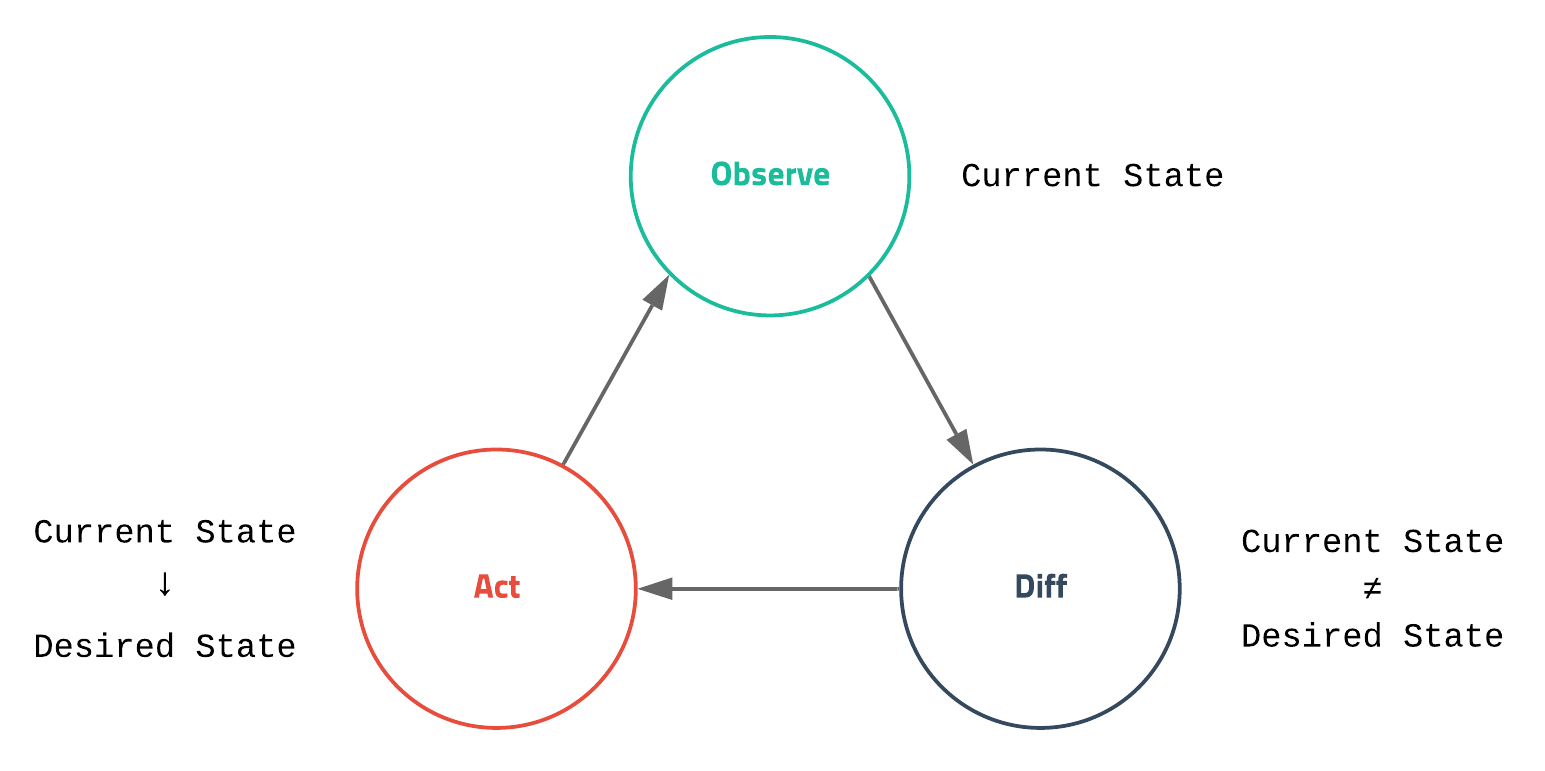
# pod 삭제명령 후 pod NAME, pod IP 확인
kubectl delete pod `kubectl get pod -o=custom-columns=NAME:.metadata.name | grep -v NAME`
kubectl get pod -o wide
kubectl get deployments
kubectl get replicasets
- Deployment Scale 를 6개에서 1개로 감소
kubectl scale deployment my-webs --replicas=1
kubectl get pod -o wide
- 삭제
kubectl delete deployments my-webs
kubectl get pod
실습 3. 선언형 파드 배포
본 실습에서는 YAML 작성 후 파드를 배포합니다. 쿠버네티스에서 모든 리소스는 YAML 형태의 선언형 명령 정의서(declarative description) 로 표현될 수 있습니다.
샘플 YAML을 생성하기 위해 kubectl run 명령에 --dry-run=client 옵션을 활용하여 기본 정의서를 생성합니다.
- myweb.yaml 이라는 YAML 정의서 생성
kubectl run myweb --image nginx --dry-run=client -o yaml
kubectl run myweb --image nginx --dry-run=client -o yaml > myweb.yaml
cat myweb.yaml으로 명세서 확인 ```yaml apiVersion: v1 # YAML 파일에서 정의한 해당 오브젝트의 API 버전 정의 kind: Pod # 리소스의 종류, 종류는 kubectl api-resources 의 KIND 항목 참고 metadata: # 라벨, 이름, 주석(Annotation) 등과 같은 리소스의 부가 정보 creationTimestamp: null labels: run: myweb name: myweb spec: # 리소스 생성하기 위한 자세한 정보를 입력, 위 예시는 포드에서 실행된 컨테이너 정보를 정의하는 containers 항목을 작성한 뒤, 하위 항목인 image 에서 사용할 도커 이미지를 지정 containers:- image: nginx name: myweb resources: {} dnsPolicy: ClusterFirst restartPolicy: Always status: {} ```
- Pod 배포
1_pod_workflow.png
# 파드 배포 : YAML 파일에 컨테이너가 사용할 포트(TCP 80)을 설정
cat <<EOF | kubectl create -f -
apiVersion: v1
kind: Pod
metadata:
  name: myweb
spec:
  containers:
  - image: nginx:alpine
    name: myweb-container
    ports:
    - containerPort: 80
      protocol: TCP
  terminationGracePeriodSeconds: 0
EOF
- Pod 상세 정보 확인 : Pod 이름, Port 80 확인
kubectl describe pod myweb
- Pod(Nginx) 에 curl 접속
ping <파드IP>
curl <파드IP>
- Pod 삭제
kubectl delete pod myweb